Expense Management for Small Business: Track, Organize, and Control Every Dollar
CanDev Team
Table of contents
Find the best expense management software for small business. Scan receipts, track spending, log mileage, and export clean reports. Free Forever on IOS & Android.
Running a small business means wearing a dozen hats. You are the founder, the manager, the sales team, and somehow also the person chasing down receipts at 11 PM before tax season. If that sounds familiar, you are not alone.
The numbers tell the story. The average expense report takes 20 minutes to process and costs $58. If errors are found, add another $52 and 18 minutes to fix each one. About 75% of employees spend over 15 minutes filing each expense report, which adds up to more than an hour every month on manual tasks that could be automated. And according to the Association of Certified Fraud Examiners (ACFE), organizations lose 5% of their annual revenue to fraud, with expense reimbursement abuse ranking among the most common schemes in small businesses.
For a small business where every dollar counts, that wasted time and money is not just an inconvenience. It is a direct hit to your bottom line.
This guide covers everything you need to know about expense management for small business: what it is, why it matters, how to set it up, what to look for in expense management software, how to stay compliant with the IRS, and how to avoid the mistakes that cost small businesses thousands every year.
What Is Expense Management and Why Does It Matter?
Expense management is the process of tracking, categorizing, approving, and reporting every dollar your business spends. It covers everything from office supplies and client lunches to mileage, subscriptions, and employee reimbursements.
For small businesses, managing business expenses is not just about bookkeeping. It directly affects your cash flow, your tax deductions, your ability to make smart financial decisions, and your protection against fraud. Without a clear system, money leaks through the cracks. Receipts get lost. Reimbursements get delayed. Employees overspend without anyone noticing. And when tax season hits, you are scrambling to piece together months of spending from memory and bank statements.
The best expense management software for small business solves this by giving you one place to capture, categorize, and export every expense, without spreadsheets, shoeboxes, or guesswork.
But expense management is also about control. It means knowing where your money is going the moment it is spent, not weeks later during reconciliation. It means setting spending policies that are enforced automatically, not manually policed. And it means having clean, audit-ready records at all times, not just when the accountant asks.
The Real Cost of Poor Expense Tracking for Small Business
Before diving into solutions, here is what happens when expense tracking for small business goes wrong.
Time Lost
According to research from the Global Business Travel Association (GBTA), nearly 19% of expense reports contain errors. Other studies put that number closer to 49% when reports are handled manually. Every error costs roughly $52 and 18 minutes to fix. Small businesses waste over 12 hours annually just on manual expense reports, and that does not include the time spent chasing receipts, re-entering data, or reconciling bank statements.
Money Lost to Fraud
The ACFE's 2026 Report to the Nations analyzed over 2,400 fraud cases across 143 countries. The findings are sobering for small businesses. Asset misappropriation, which covers expense reimbursement abuse, billing fraud, and check tampering, appeared in 90% of all fraud cases. The median loss for organizations with fewer than 100 employees was $126,000. That is not a rounding error. For a small business, that can be the difference between staying open and shutting down.
Missed Tax Deductions
Every dollar of unclaimed deduction means extra tax paid unnecessarily. Small, recurring expenses like software subscriptions, parking, tolls, and mileage are among the most commonly overlooked deductions. Missing receipts and poor documentation force business owners to leave legitimate deductions on the table, because without proper records, you cannot claim what you cannot prove.
Cash Flow Blind Spots
Without real-time visibility into spending, overspending goes unnoticed until it becomes a crisis. Budget conversations become reactive instead of strategic. You find out you went over budget last month only after the bank statement arrives, when it is already too late to do anything about it.
7 Signs You Have Outgrown Manual Expense Tracking
Many small businesses start with spreadsheets, shared folders, or simply stuffing receipts into envelopes. That approach works until it does not. Here are the signs that manual tracking is costing you more than it saves:
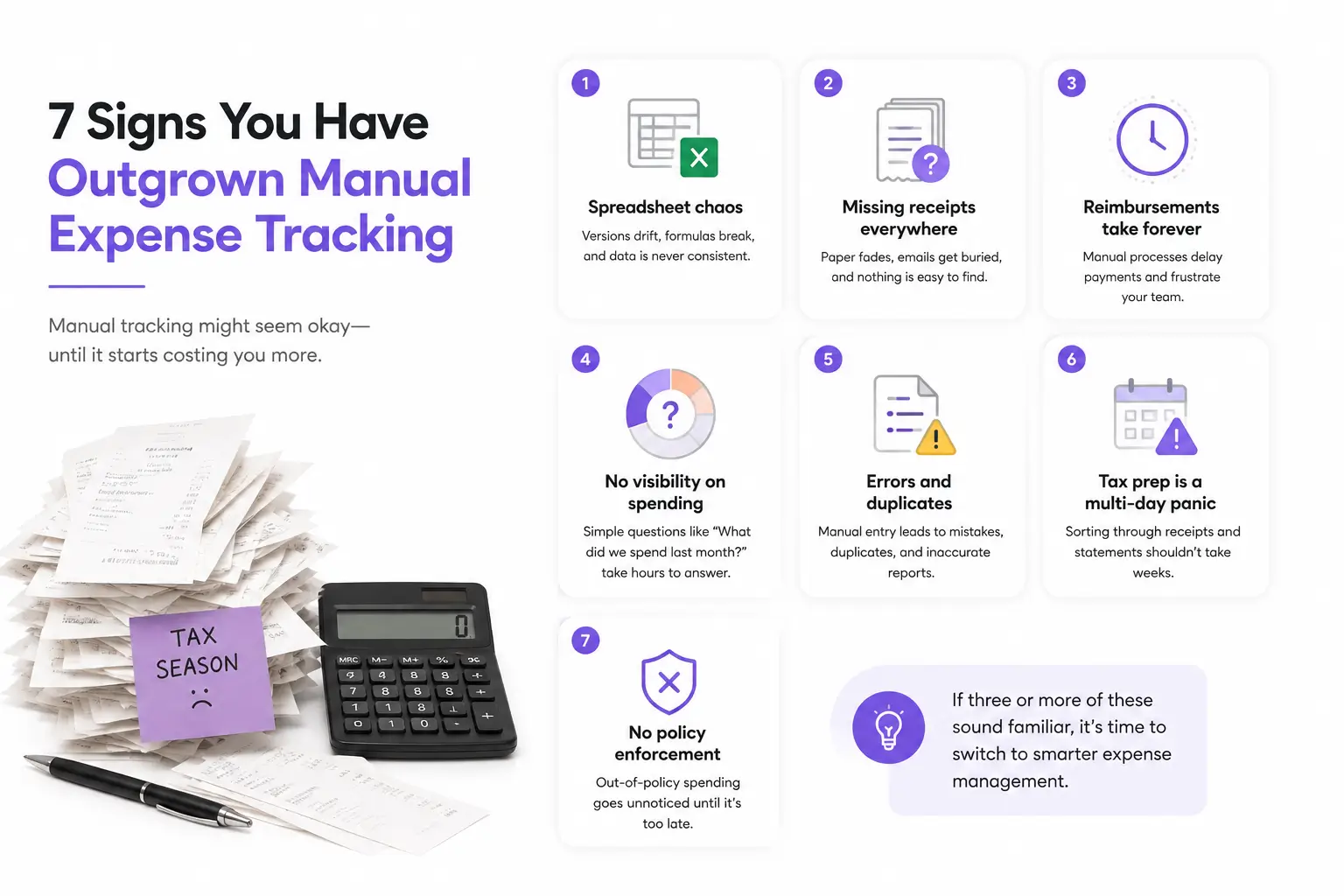
1. Spreadsheet chaos. Different people track expenses differently. Versions drift. Formulas break. Your finance person spends more time cleaning data than analyzing it.
2. Missing receipts everywhere. Paper fades. Emails get buried. When tax season arrives, you are digging through drawers, wallets, and old email threads trying to reconstruct three months of spending.
3. Reimbursements take forever. Manual processes delay reimbursements, which frustrates employees and damages trust. In a small business, slow reimbursements can create real financial stress for your team.
4. You have no idea what you spent last month. If answering how much did we spend on travel last quarter? requires hours of digging, your system is broken.
5. Duplicate entries and errors keep showing up. Manual data entry is prone to human error. One wrong formula, one missed row, and your entire report is inaccurate.
6. Tax prep is a multi-day panic. If preparing for taxes means weeks of sorting through receipts, bank statements, and credit card bills, you are doing it the hard way.
7. You cannot tell if spending policies are being followed. Without automated policy enforcement, you only discover out-of-policy purchases after the money is already gone.
If three or more of these sound familiar, it is time to switch to dedicated expense management software for small business.
How to Set Up Expense Management for Your Small Business
Getting expense management right does not require a finance team or an enterprise budget. It starts with a few simple systems.
1. Separate Personal and Business Spending
This is the foundation. If your personal and business expenses are mixed together, tracking becomes a nightmare. Open a dedicated business bank account and use a business credit card for all company purchases. This makes it dramatically easier to manage business expenses and keeps your records clean for tax purposes.
If you are a freelancer or sole proprietor running both personal and business accounts, look for a small business expense tracking app that lets you switch between separate accounts. Some apps support up to 10 accounts, so you can keep everything organized without needing multiple tools.
2. Create a Clear Expense Policy
Even if you are a team of one, write down what counts as a business expense and what does not. If you have employees, this becomes essential. Your policy should cover which expenses are eligible for reimbursement, spending limits by category (meals, travel, supplies), the approval process for larger purchases, receipt requirements and submission deadlines, and consequences for policy violations.
A clear policy does more than reduce confusion. It is your first line of defense against fraud. The ACFE found that organizations with formal reporting mechanisms experienced a median fraud loss of $100,000, compared to $150,000 for those without one. Structure matters.
3. Set Up Approval Workflows
For businesses with employees, even a small team of two or three, approval workflows prevent unauthorized spending before it becomes a problem. The best expense management software lets you customize approval chains based on spending amount, category, or department.
For example, expenses under $50 might be auto-approved, while anything over $200 requires manager review. This keeps small purchases flowing smoothly while adding a checkpoint for larger ones. Automated approval workflows remove the bottleneck of chasing managers for signatures on paper forms.
4. Capture Receipts Immediately
This is where most small businesses fail. You buy something, stuff the receipt in your pocket, and forget about it. Two months later, you have no idea what that $47.50 charge was.
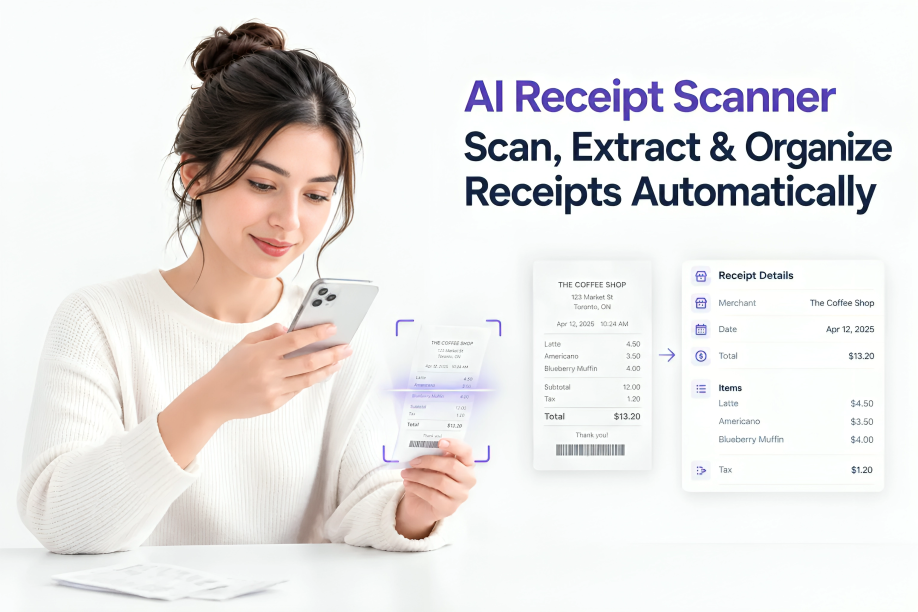
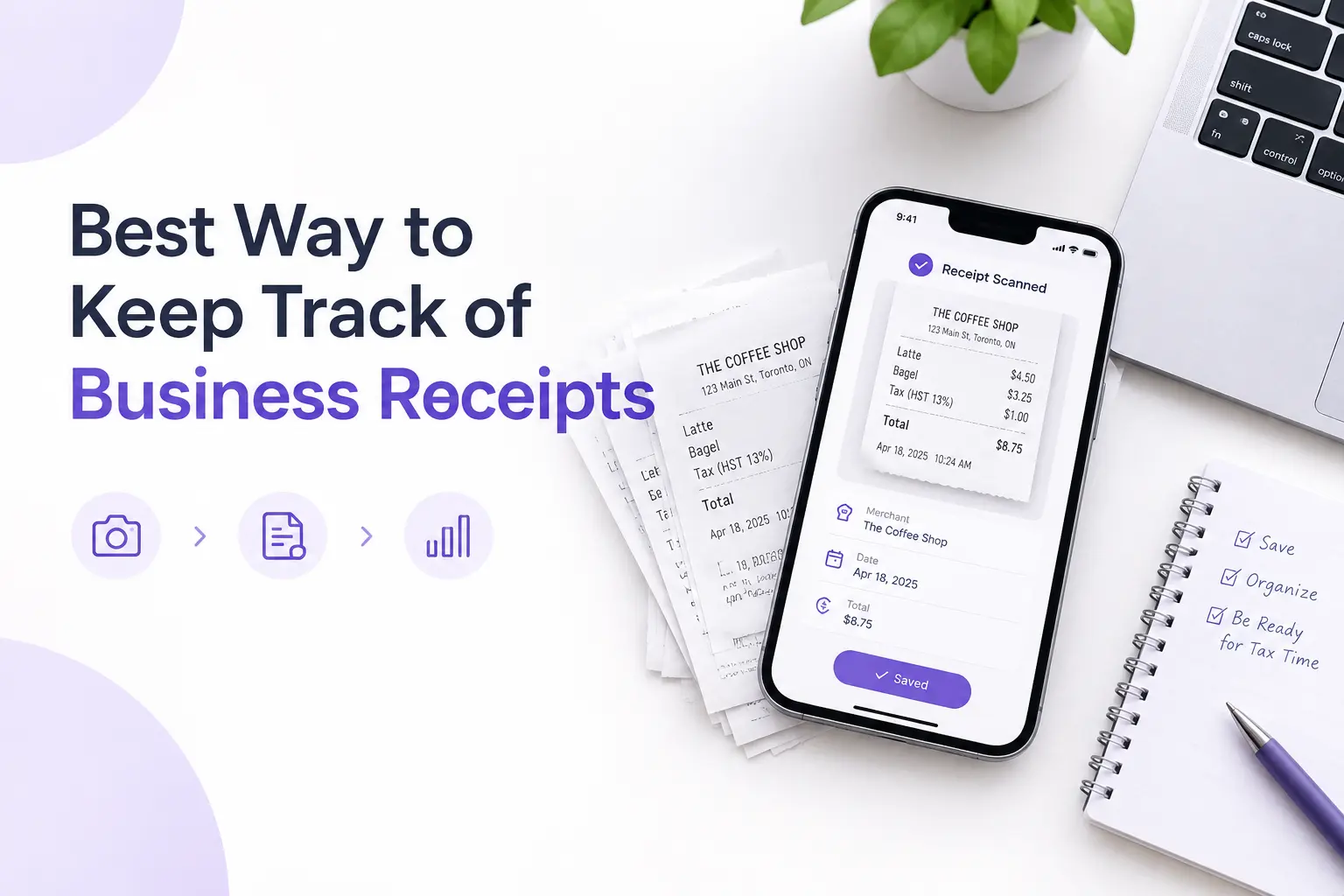
The fix is simple: scan every receipt the moment you get it. The best receipt scanner and organizer app lets you snap a photo with your phone and automatically extracts the merchant name, date, total, and tax. No typing, no filing, no lost paper. The whole process takes about 3 seconds.
Modern receipt scanner and organizer software uses AI to read receipts instantly, even faded thermal paper or crumpled ones from the bottom of your bag. The data gets categorized and saved digitally, so you always have a clean record ready for your accountant or the IRS.
5. Categorize Every Expense
The IRS requires you to keep records that substantiate business expenses, and proper categorization is part of that. Common categories include office supplies, travel, meals and entertainment, vehicle and mileage, software and subscriptions, professional services, and marketing.
The best expense tracking app for small business will suggest categories automatically based on the merchant and purchase type. You review, adjust if needed, and save. This makes end-of-month reporting and tax preparation dramatically faster.
6. Track Mileage Separately
If you or your employees drive for business, mileage is a significant deductible expense that most small businesses either forget to track or track poorly. Writing down odometer readings on sticky notes is not a reliable system.
The best mileage tracking app for small business logs every trip automatically. You tap start when you drive and stop when you arrive. Distance, route, and date are all saved. At tax time, you export your mileage log alongside your expense reports, and your accountant gets exactly what they need.
7. Set Budgets and Spending Controls
Setting monthly spending limits by category and getting notified when you are close helps you control costs before they become a problem. This is the difference between reactive expense management (finding out you overspent after the fact) and proactive spend control (preventing overspending before it happens).
The best tools let you set per-employee limits, per-category budgets, and even restrict spending to specific merchant types. Spending controls are especially important when employees have access to company funds or corporate cards.
8. Review Expenses Weekly
Do not wait until month end to look at your spending. Set aside 15 minutes every week to review your expenses, check for anything miscategorized, and make sure nothing is missing. This small habit prevents the month-end panic that most small business owners know too well.
A weekly review also helps you catch unusual spending early. If someone accidentally double-submits an expense or a subscription price jumps, you will notice within days instead of months.
9. Export Clean Reports
When your accountant asks for your expense data, you should be able to hand it over in one tap. The best expense tracking software for small business lets you export clean CSV reports with merchant names, dates, amounts, tax, and categories, exactly what is needed for bookkeeping and tax preparation.
If your current system requires you to manually compile data from bank statements, email receipts, and paper files, you are spending hours on something that should take seconds.
Choosing the Best Expense Management Software for Small Business
The market is full of expense management companies and tools, from enterprise platforms built for corporations to simple apps designed for freelancers and small teams. Not all expense tracking tools are built the same, and a good spend management software goes beyond basic expense tracking.
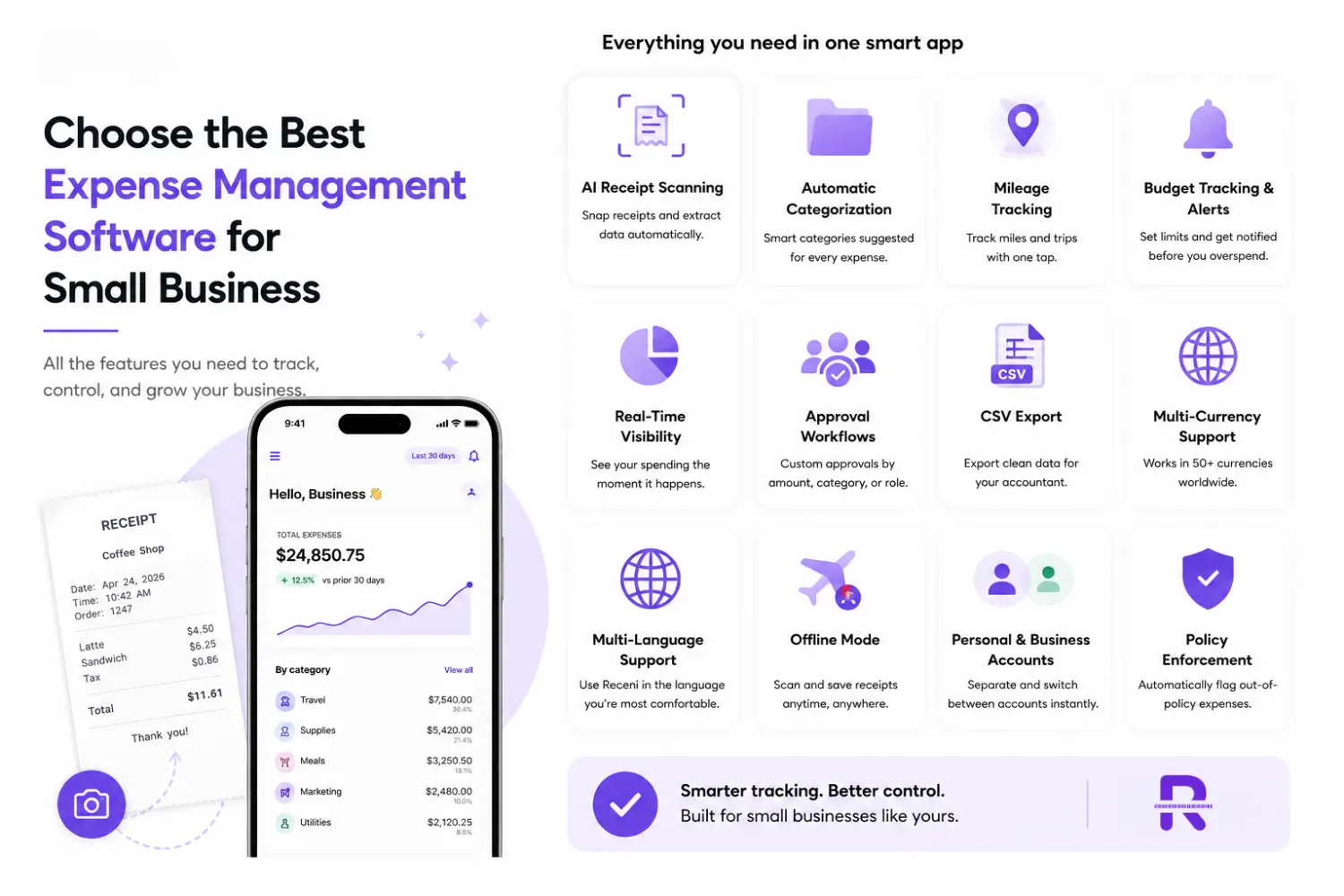
Here is what to look for and what separates the tools that work from the ones that create more work.
Key Features to Look For (And What to Avoid)
Must-Have Features
AI Receipt Scanning. The app should let you snap a photo of any receipt and automatically extract the key data: merchant, date, total, tax, and line items. No manual typing. This is the single biggest time saver for small business receipt management.
Automatic Categorization. The software should suggest expense categories based on the merchant and purchase type. You review and confirm, but the heavy lifting is done for you.
Mileage Tracking. If driving is part of your business, built-in mileage tracking means one less app to manage. Look for something that logs trips with one tap.
Budget Tracking and Spending Alerts. Setting monthly spending limits and getting notified when you are close helps you control costs proactively, not reactively.
Real-Time Spend Visibility. You should be able to see where your money is going the moment it is spent, not weeks later during reconciliation. Real-time tracking gives finance teams complete visibility over company spending and prevents overspending before it becomes a problem.
Approval Workflows. For teams, customizable approval chains allow managers to review and approve expenses before reimbursement. Look for software that lets you set different approval rules by amount, category, or employee.
CSV Export. Your accountant needs clean data. One-tap export to CSV is essential for any expense report software for small business.
Multi-Currency Support. If you do any international business or travel, the app should handle multiple currencies without extra work. Look for apps supporting 50 or more currencies to cover all your needs.
Multi-Language Support. For businesses with diverse or international teams, an app that works in multiple languages removes friction and ensures everyone can use it comfortably.
Offline Mode. You should be able to scan and save receipts without an internet connection. The data syncs when you are back online.
Personal and Business Accounts. Freelancers and small business owners often need to track both. The app should let you separate them completely and switch between accounts instantly.
Policy Enforcement. The software should flag or block out-of-policy expenses automatically. Automated policy enforcement catches violations at the point of purchase, not after the money is already spent.
What to Avoid
Overly complex enterprise tools. If you are a small business, you do not need a corporate travel management software suite with 200 features you will never use. Many enterprise platforms (like SAP Concur) have a reputation for clunky interfaces that frustrate small teams. Look for something simple that does the core job well.
Apps with no free tier. The best expense tracker for small business should let you get started for free so you can test it before committing. Look for a free forever plan that includes core features like receipt scanning and expense tracking.
Tools that require desktop-only access. You need to track expenses on the go, from your phone, at the point of purchase. A company expenses app that only works on desktop defeats the purpose.
Software that increases pricing steeply as you grow. Some tools are affordable for two people but become expensive quickly as you add team members. Check how pricing scales before committing.
Platforms with poor mobile apps. If the mobile experience is slow, buggy, or limited compared to desktop, you will end up not using it when it matters most: at the point of purchase.
How to Evaluate and Compare Expense Software
Choosing between expense management tools can feel overwhelming. Here are the evaluation criteria that matter most for small businesses, ranked by importance:
1. Ease of Use. The platform should be intuitive enough that employees can start tracking expenses without training. If your team needs a manual to file an expense, adoption will be low and the tool will fail.
2. Automation Capabilities. How much manual work does the tool eliminate? Look for automated receipt scanning, automatic categorization, automated approvals, and automated reconciliation with your accounting system.
3. Mobile Experience. Your team needs to scan receipts and log expenses on the go. The mobile app should have full functionality, not just a stripped-down version of the desktop experience.
4. Integration with Accounting Software. The tool should sync seamlessly with whatever accounting system you already use, whether that is Receni, QuickBooks, Xero, FreshBooks, or something else. Native integrations reduce reconciliation work, eliminate double entry, and keep financial records accurate.
5. Scalability. Choose software that works for your team today and can grow with you. If you are two people now but plan to hire, make sure the tool supports multiple users, role-based permissions, and team-based approvals without requiring a platform switch.
6. Security and Data Protection. The tool should use encryption, secure access controls, and regular backups to protect sensitive financial data. Look for multi-factor authentication and SOC 2 compliance where possible.
7. Pricing. For many small businesses, price is the major consideration. Many providers offer tiers ranging from free or low-cost (with limitations) to more expensive packages with advanced features. The best choice meets your requirements and fits your budget without surprise fees.
8. Customer Support. When something breaks during tax season, you need help fast. Check what support channels are available (chat, email, phone) and what response times to expect.
Best Way to Track Business Expenses for Taxes
Tax compliance is one of the biggest reasons small businesses need solid expense management. The IRS expects you to keep records that substantiate every business deduction, and I think I spent about $200 on supplies does not count.
Here is the best way to keep track of business expenses for tax purposes:
Keep every receipt. The IRS recommends keeping records for at least three years, and longer in certain circumstances. Digital copies are fully accepted, so scanning receipts with an app is not just convenient, it is IRS-compliant.
Record expenses within 24 to 48 hours. The closer to the point of purchase, the better. Waiting until month end means lost receipts and forgotten details. Every dollar of missed deduction means extra tax paid unnecessarily.
Track income and expenses separately. The best way to track income and expenses for small business is to have them in separate, clearly labeled categories so your accountant can see exactly what came in and what went out.
Know your deductible categories. Business meals are typically 50% deductible. Home office expenses, vehicle mileage, software subscriptions, and professional services are all deductible if properly documented. The best way to track business expenses for taxes is to categorize them correctly from day one, not retroactively during filing.
Export clean records. When tax season arrives, you should be able to export a complete expense report with every receipt, category, and amount ready for your accountant. This is where expense report software for small business pays for itself many times over.
Create a monthly close routine. Reconcile bank and credit card accounts, categorize uncoded transactions, attach digital receipts, update mileage, and note business purpose while the details are fresh. Small businesses that do monthly closes avoid the annual tax-season panic entirely.
IRS Receipt Rules Every Small Business Owner Should Know
There is a lot of confusion about what the IRS actually requires when it comes to receipts. Here are the rules that matter:
Five data points on every expense. The IRS requires five specific pieces of information for every documented business expense: the amount, the date, the place (vendor), the business purpose, and the business relationship (who was involved, if applicable).
The $75 rule is not what you think. The popular no receipt needed under $75 is a simplification that gets people in trouble. It applies only to specific expense categories covered under Section 274(d) of the tax code, not to all business expenses. For those categories, receipts are generally required at $75 or more. For everything else, you still need some form of substantiation regardless of amount.
Digital receipts are fully accepted. The IRS accepts physical receipts, digital copies, credit card statements, and bank records as proof of deductible expenses. As long as the record is legible and complete, a photo taken with your phone is just as valid as the original paper.
Itemized vs. summary receipts. For any expense where the nature of the purchase is not obvious from the receipt, you need the itemized version. A credit card charge showing $85 at Restaurant ABC is not enough if the IRS wants to know what was purchased and why.
Keep records for at least three years. The IRS recommends a three-year minimum retention period for expense records, though longer is safer in certain situations (such as if you underreport income by more than 25%).
Expense Management for Different Business Types
Freelancers and Self-Employed
As a freelancer, you are the entire finance department. The best app for small business expenses in your case is one that is fast, mobile, and does not require a learning curve. You need to scan receipts on the go, separate personal and business spending, track mileage if you drive to client sites, and export reports for quarterly or annual tax filings.
A free business expense tracker app with AI scanning and mileage tracking covers everything a freelancer needs without paying for features designed for large teams. Look for apps with a free forever plan so you can get started without financial risk.
Small Business Owners with Employees
When employees are making purchases on behalf of the company, expense management gets more complex. You need a system where employees can submit expenses easily from their phones, managers can review and approve them through customizable workflows, receipts are attached to every expense report, spending policies are enforced automatically, and the whole process flows cleanly into your accounting system.
The best expense management software for small business in this scenario should support multiple users, role-based approvals, and employee expense reimbursement software that makes the process smooth for everyone. Fast reimbursements matter: delayed reimbursements frustrate employees and damage trust, especially in small teams.
Delivery and Gig Workers
If your business involves driving, mileage tracking is not optional. It is money. Every untracked mile is a missed tax deduction. The best mileage tracking app for small business lets you log trips automatically without thinking about it. Combined with receipt scanning for fuel, tolls, and vehicle maintenance, you get a complete picture of your driving expenses.
People tend to keep fuel receipts but skip the mileage detail, and parking, tolls, and jobsite trips get overlooked when paid in small transactions. These small amounts add up significantly over a year.
Remote and Distributed Teams
Remote teams face unique expense management challenges. Employees are purchasing from different locations, sometimes different countries, and there is no central office where receipts can be collected. An expense tracking app that works equally well on mobile and desktop, supports multiple currencies, and provides real-time visibility into spending across your distributed team is essential.
Cloud-based expense management ensures that every team member has equal access to the same tools regardless of where they work. Look for apps available in multiple languages if your team spans different regions.
Teams That Travel
Business travel adds complexity with flights, hotels, meals, and transportation all happening in different cities and currencies. While you may not need full corporate travel management software, you do need a way to capture receipts in real time (especially from airports and restaurants where paper receipts fade fast), track spending across multiple currencies, and set per-trip or per-category budgets to keep travel spending under control.
How to Implement Expense Software Without the Headaches
Buying expense management software is the easy part. Getting your team to actually use it is where most small businesses stumble. Here is how to make the transition smooth:
Step 1: Assess your current process. Before choosing a tool, document how expenses are currently tracked. What is working? What is broken? What takes the most time? This clarity helps you choose software that solves your actual problems, not hypothetical ones.
Step 2: Start with the free plan. Most good expense management tools offer a free tier. Use it. Test the app with real expenses for at least two weeks before committing to a paid plan. Pay attention to the mobile experience, since that is where most expense tracking actually happens.
Step 3: Set up your categories and policies first. Before inviting your team, configure your expense categories to match your business and align with tax deduction categories. Set up any spending limits, approval workflows, or policy rules.
Step 4: Onboard your team with a 10-minute walkthrough. The right tool should be intuitive enough that a short walkthrough is all your team needs. Show them how to scan a receipt, submit an expense, and check their reimbursement status. If the tool requires extensive training, it is probably too complex.
Step 5: Scan your backlog. If you have a pile of old receipts, scan them all in one sitting. Get to a clean starting point so you are not mixing old processes with new ones.
Step 6: Connect your accounting software. Sync the expense tool with your accounting system (QuickBooks, Xero, FreshBooks, or whatever you use). This eliminates double entry and keeps your books automatically up to date.
Step 7: Set clear expectations. Tell your team: every purchase gets scanned immediately. No exceptions. It takes 3 seconds and saves hours later. Make it part of the workflow, not an afterthought.
Step 8: Review and refine monthly. After the first month, check what is working and what is not. Are categories accurate? Are approval workflows too slow? Are there expenses that keep getting miscategorized? Adjust and improve.
Common Expense Management Mistakes to Avoid
Mixing personal and business expenses. This is the number one mistake. It makes tax filing harder, increases audit risk, and makes it nearly impossible to see your true business spending.
Relying on memory. You will not remember that $12 parking fee from three weeks ago. Scan it or log it the moment it happens.
Using spreadsheets for everything. Spreadsheets work until they do not. One wrong formula, one missed row, and your entire expense report is wrong. The best software to keep track of business expenses automates the parts that humans get wrong. Different people track differently, versions drift, and errors creep in.
Ignoring small expenses. A $5 coffee here, a $3 parking meter there. Small expenses add up to significant amounts over a year. Track everything. Small, recurring expenses like software subscriptions are among the most commonly overlooked deductions every tax year.
Waiting until tax season. If you only look at your expenses once a year, you are guaranteed to have gaps, errors, and stress. Weekly reviews take 15 minutes. Annual catch-up takes days.
Not backing up receipts. Paper fades. Phones break. The best receipt tracker for small business stores everything in the cloud automatically, so your data is safe even if your phone is not.
No expense policy. Without a written policy, employees do not know what is allowed and what is not. This leads to overspending, inconsistent submissions, and uncomfortable conversations after the fact. Write the policy first, even if your team is small.
Skipping approval workflows. Even for small teams, having at least a basic approval process for expenses over a certain amount prevents unauthorized spending and catches errors before they hit your books.
Ignoring fraud risk. Small businesses often assume fraud will not happen here. The data says otherwise. The ACFE found that tips are the number one method for detecting fraud (43% of cases), which means having a way for employees to flag suspicious activity matters, even in small teams.
Security and Data Protection
Your expense management software handles sensitive financial data: bank details, spending patterns, employee information, and tax records. Security should not be an afterthought.
Here is what to look for:
Encryption. All data should be encrypted both in transit and at rest. This means your receipt photos, expense details, and financial records are protected even if someone intercepts the data.
Secure access controls. The tool should support multi-factor authentication (MFA) so that a stolen password alone is not enough to access your financial data.
Automatic cloud backups. Your expense data should be backed up automatically. If your phone breaks, your laptop crashes, or your office floods, your records should be safe in the cloud.
Data privacy. Understand where your data is stored and who has access to it. Look for tools with clear privacy policies and, where applicable, SOC 2 compliance or equivalent security certifications.
Role-based access. Not everyone on your team needs to see all financial data. The software should let you control who can view, edit, and approve expenses based on their role.
How AI Is Changing Expense Management for Small Business
The biggest shift in small business expense management over the past few years is AI. What used to require manual data entry, spreadsheets, and hours of sorting now happens automatically.
Modern AI-powered expense apps can read any receipt instantly and extract merchant name, date, total, tax, and line items. They suggest the right expense category based on the purchase. They detect duplicate entries before they become a problem. They flag unusual spending patterns so you can catch issues early. They auto-match receipts to transactions, reducing errors and fraud. And they work in multiple languages and currencies, which matters if your business operates internationally.
The global expense management software market is projected to grow from $8.48 billion in 2026 to an estimated $13.82 billion by 2031, driven largely by AI automation and the shift away from manual processes.
This is not enterprise technology anymore. The best expense app for small business now includes AI receipt scanning on free plans, making it accessible to solo freelancers and small teams alike. You do not need a corporate budget to get corporate-level automation.
Building Your Expense Management System: A Step-by-Step Checklist
If you are starting from scratch, here is your action plan:
Step 1: Choose your tool. Pick an expense management software for small business that includes receipt scanning, categorization, mileage tracking, budget alerts, and CSV export. Start with a free plan to test it.
Step 2: Set up your categories. Create expense categories that match your business and align with tax deduction categories. Common categories: office supplies, travel, meals, vehicle/mileage, software/subscriptions, professional services, marketing.
Step 3: Write your expense policy. Document what qualifies as a business expense, spending limits, receipt requirements, and submission deadlines. Share it with your team.
Step 4: Configure approval workflows. Set up who approves what, and at what dollar threshold. Keep it simple: auto-approve small purchases, require review for larger ones.
Step 5: Connect your accounting software. Sync your expense tool with Receni, or whatever system you use. This eliminates double entry.
Step 6: Scan your backlog. If you have a pile of old receipts, scan them all in one sitting. Get to a clean starting point.
Step 7: Build the habit. Every purchase gets scanned immediately. No exceptions. It takes 3 seconds and saves hours later.
Step 8: Set budgets. Use the app's budget tracking features to set monthly spending limits by category. Get alerts before you overspend.
Step 9: Review weekly. Spend 15 minutes every week checking your expenses. Fix anything that is miscategorized or missing.
Step 10: Export monthly. Generate a clean report at the end of every month. Send it to your accountant or file it for tax season.
Step 11: Breathe. Your expenses are organized. Tax season is handled. Month end is no longer a crisis. Fraud risk is minimized. Your accountant loves you.
The Bottom Line
Expense management for small business does not have to be complicated. The businesses that get it right are not doing anything fancy. They are just capturing every expense in real time, categorizing it properly, enforcing spending policies, and reviewing regularly.
The tools exist to make this almost effortless. AI receipt scanning turns a 20-minute manual process into a 3-second scan. Automatic categorization eliminates the guesswork. Approval workflows prevent overspending before it happens. One-tap export replaces hours of spreadsheet work. And real-time visibility means you always know where your money is going.
Whether you are a freelancer tracking receipts between client meetings, a small business owner trying to get a handle on team spending, a remote team managing expenses across time zones, or a gig worker logging every mile, the right expense management app puts you in control of your money without taking over your day.
Stop chasing receipts. Start scanning them. Your accountant, your tax filings, your cash flow, and your stress levels will all be better for it.